
How to Replace an Outdated Business Website (Without Losing Google Rankings)
How to replace an outdated business website quickly with AI, keep your domain and Google rankings, and go live the same day. Includes a checklist.
Short answer: the quickest way to replace an outdated business website is to use an AI website builder that can read your current site and rebuild it. Paste in your website address, review the new version, keep your existing domain, set up redirects for any pages that change address, then publish. Done carefully, you keep your Google rankings and your customers won't notice anything except a better website.
Signs your website is outdated
- It looks cramped or broken on a phone.
- It loads slowly, especially on mobile data.
- Your services, prices, team or opening hours are out of date.
- You can't update it yourself and have to email someone for every change.
- It doesn't show the padlock (SSL) in the browser.
- It's not bringing in enquiries anymore.
If two or more of these sound familiar, a rebuild will usually do more for you than another patch.
Before you start: protect what's working
Your old site may be ranking on Google for searches that bring you customers. Protect that by:
- Keeping your domain. Your new website should go live on the same domain.
- Listing your current pages. Note every page address, especially services and location pages. Your sitemap (usually yourdomain.com/sitemap.xml) is a quick way to get the list.
- Saving content that still works: reviews, case studies, licence details and photos.
- Checking what brings traffic in Google Search Console or your analytics, if you have them.
Step 1: Rebuild from your existing site
Choose an AI website builder that can use your current website as a starting point. In Relume, paste in your website address and it uses your existing content to build a modern, faster site with pages designed by professional web designers. You're not starting from a blank page, and you're not copying the old design.

Step 2: Update and improve the content
This is your chance to fix what was wrong. Update services and prices, add recent reviews and photos, and make sure every page has a clear call to action, like a phone number or quote form. Add an FAQ section with the questions customers ask most often.
Step 3: Match your old page addresses, or redirect them
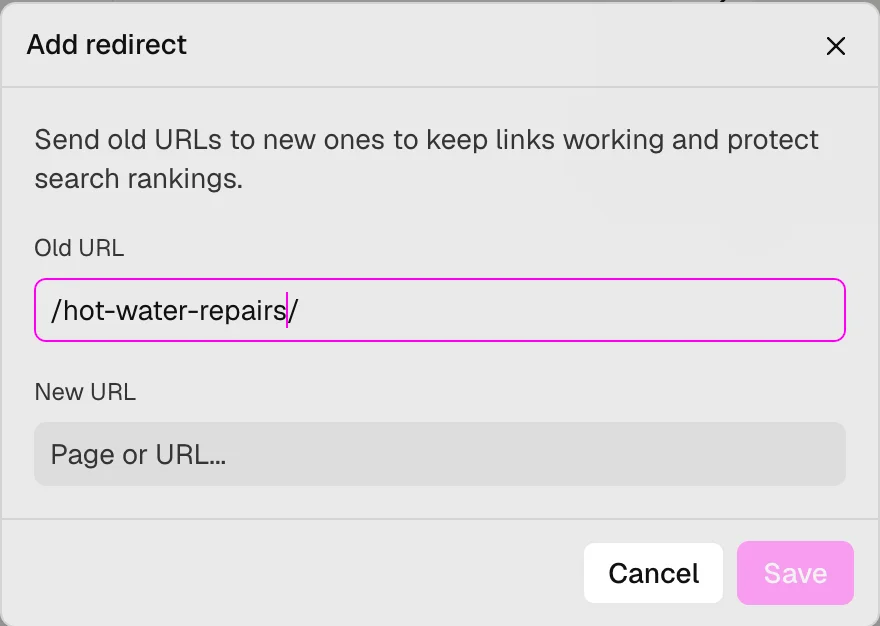
If a page keeps the same address, such as /services/hot-water, nothing else is needed. If an address changes, set up a 301 redirect from the old address to the new one. This tells Google the page has moved, so you keep its ranking and old links still work. Relume lets you set up 301 redirects in your site settings.
Step 4: Check it on your phone
Open the preview on your phone and test everything a customer would do: tap the phone number, submit the contact form, read the services and find your location.
Step 5: Switch your domain over
Connect your domain to the new website in your builder's settings, then update your domain's DNS records as instructed. Changes can take anywhere from a few minutes to a day to reach everyone. Your builder should handle SSL for you. See how to put your website on your own domain for the details.
Step 6: Tell Google about the new site
- Submit your new sitemap in Google Search Console.
- Check your Google Business Profile links to the right pages.
- Make sure your business name, address and phone match exactly across your website and listings.
Step 7: Cancel the old hosting, carefully
Only cancel your old hosting once the new site is live and working, and make sure you're not cancelling your domain registration or email by accident. These are often bundled with old hosting plans.
Moving from Wix or Squarespace specifically? See Relume vs Wix and Relume vs Squarespace, or read whether you can move your website to another platform.
Website replacement checklist
- Same domain
- List of old page addresses saved
- Content updated: services, prices, reviews, photos
- 301 redirects for any changed addresses
- Forms and click-to-call tested on mobile
- Domain connected and SSL working
- Sitemap submitted to Google Search Console
- Google Business Profile checked
- Old hosting cancelled, domain and email kept
FAQ
Will I lose my Google rankings if I replace my website?
Not if you keep your domain, keep or redirect your page addresses, and keep the content that ranks. Short dips can happen while Google re-crawls the site.
Can I keep my email address?
Yes. Your email is usually set up separately from your website. Just don't change your domain's email (MX) records when you connect the new site.
How long does it take?
With an AI website builder that reads your current site, you can have a new version ready to review in minutes and live the same day, depending on how much content you want to update.
How much does it cost to replace a business website?
Agencies often charge thousands. With Relume you can rebuild for free and pay for hosting once you go live: US$14 per site per month billed yearly, or US$16 billed monthly.